Pages
- Home
- OCR SPECIFICATION
- OCR MEDIA STUDIES H409
- G322 TV DRAMA
- 1 FORMS & CONVENTIONS
- 2 REPRESENTATION OF SOCIAL GROUPS
- 3 DISTRIBUTION
- 4 Who is YOUR TARGET AUDIENCE for your film?
- 5 ATTRACTING & ADDRESSING AUDIENCES
- 6 NEW TECHNOLOGIES
- 7 WHAT I HAVE LEARNED ABOUT FILM MAKING
- G322 Past Papers*
- 2012 G322: INSTITUTIONS & AUDIENCES (FILM)
- 2014 G322: INSTITUTIONS & AUDIENCES (FILM)
- 2017 G322: INSTITUTIONS & AUDIENCES (FILM)
- NARRATIVE
- BLOG TOOLS
- BRITISH INDEPENDENT FILM
- FILM TRENDS
Monday, 28 September 2015
REPRESENTATION and NARRATIVE VIEWPOINT
The Kanizsa triangle: what do you see?
The Guardian newspaper advertisement (here) shows the power of the Kanizsa triangle effect on storytelling by demonstrating how we automatically create stories based on the limited information we have available.
A very clever piece of advertising aimed at making the viewer look at the wider picture.
Played out in black and white, a skinhead turns on a street corner and runs at speed towards a man with a briefcase.
Look at the next example of ingenious treatment of narrative which takes a children's story The Three Little Pigs and treats it as live news delivered with a vast range of new technology.
Tuesday, 22 September 2015
PRELIM
Your work today is filming and for PREP editing your prelim, then posting the account plus the final cut.
Friday, 18 September 2015
PRACTICAL PHOTOGRAPHY
You familiarize yourselves with the Canon cameras, Manfrotto tripods and the dolly. You take still shots and video.
Wednesday, 16 September 2015
G322 TEXTUAL ANALYSIS OF TV DRAMA
Exam paper taken from January 2010. Extract from Hotel Babylon HERE
Question:
The way to gain full marks is by doing 3 steps (identify technical term, give example, analyse / explain / argue).
Here is an example:
1. First, identify the technical term (close-up, tracking shot, dialogue, zoom, rapid straight cuts....)
2. Then, give the example in detail ('The close- up of Paul's concerned face shows his emotions: he is seriously worried about hyperglycemia as his medical training alerts him to the seriousness of his condition.')
3. Finally, bring in the focus of the question ('This shows the audience that despite working as a hotel cleaner, he is much better qualified than he seems, as he is a doctor, but is forced to work in a low-paid, insecure job because of his precarious status as an illegal immigrant from the African subcontinent').
PREP Complete the exam answer by next Tuesday's class.
Print off / hand in on paper (please do any printing before the lesson).
Hand in earlier if you wish.
For film language discussing textual analysis, look at the Specification here (page 18)
There are many other websites that have glossaries as well as books that have indexes, such as the OCR textbook
For example, http://www.educationscotland.gov.uk/Images/medstudhglossary_tcm4-168240.pdf
http://www.mediacollege.com/glossary/
http://media.edusites.co.uk/
http://brianair.wordpress.com/film-theory/glossary-of-media-terminology/
http://www.nzqa.govt.nz/qualifications-standards/qualifications/ncea/subjects/media-studies
/glossary/
Question:
1 Discuss the ways in which the extract constructs representations of ethnicity using the following:
• Camera shots, angles, movement and composition
• Editing
• Sound
• Mise-en-scene [50]
The way to gain full marks is by doing 3 steps (identify technical term, give example, analyse / explain / argue).
Here is an example:
1. First, identify the technical term (close-up, tracking shot, dialogue, zoom, rapid straight cuts....)
2. Then, give the example in detail ('The close- up of Paul's concerned face shows his emotions: he is seriously worried about hyperglycemia as his medical training alerts him to the seriousness of his condition.')
3. Finally, bring in the focus of the question ('This shows the audience that despite working as a hotel cleaner, he is much better qualified than he seems, as he is a doctor, but is forced to work in a low-paid, insecure job because of his precarious status as an illegal immigrant from the African subcontinent').
PREP Complete the exam answer by next Tuesday's class.
Print off / hand in on paper (please do any printing before the lesson).
Hand in earlier if you wish.
MEDIA LANGUAGE
There are many other websites that have glossaries as well as books that have indexes, such as the OCR textbook
For example, http://www.educationscotland.gov.uk/Images/medstudhglossary_tcm4-168240.pdf
http://www.mediacollege.com/glossary/
http://media.edusites.co.uk/
http://brianair.wordpress.com/film-theory/glossary-of-media-terminology/
http://www.nzqa.govt.nz/qualifications-standards/qualifications/ncea/subjects/media-studies
/glossary/
Tuesday, 15 September 2015
HOW OPENING SEQUENCES FUNCTION
We complete the analysis of the title sequence of Nowhere Boy (dir. Sam Taylor-Wood 2011). You do this research and present it to prove that you're properly prepared to make your own film opening.
Return to your work and check that you have noted:
Irrespective of the genre, there is a conventional way of presenting this information in the credit sequence. This information and the order in which it is presented follows a standard format. Later in this study we will be looking more closely at the title sequence in a James Bond film but by way of introduction, we will look at the conventional way of presenting information as shown in the title sequence to the 1978 film Superman.
Return to your work and check that you have noted:
- how location and genre are indicated in the establishing shot,
- the institutional information about producers and funding,
- the use of the soundtrack - the rock n'roll era and the lyrics 'you're a real wild child'
- the director's name.
- You also note how theme is introduced ( Lennon as defiant, rule-breaking innovator; Lennon as rising to the insult that he will 'go nowhere'). When are the top billing actors named?
- The overall style is significant and carefully crafted to complement the genre and theme. For example, typography, lighting, colour palette, imagery, cinematography, editing. (Nowhere Boy is a biopic so the lighting is naturalistic.)
- Note how the audience's interest is engaged and the main narrative launched.
Functions of the Title Sequence
The functions of the title sequence in a film may seem to be fairly obvious. They are designed to tell the audience the names of the people and organisations involved with the making of the film and in this respect they do the job well.Irrespective of the genre, there is a conventional way of presenting this information in the credit sequence. This information and the order in which it is presented follows a standard format. Later in this study we will be looking more closely at the title sequence in a James Bond film but by way of introduction, we will look at the conventional way of presenting information as shown in the title sequence to the 1978 film Superman.
Codes and Conventions
- The producer’s name will generally be the first to appear followed by the word ‘presents.’ This is because the producer is the person who takes overall responsibility for the planning and the production of all aspects of the film; it is in fact, the producer’s film to offer to us.
- It is usual for the next screen to show the name of the director who is responsible for the artistic and creative elements of the film. In the case of Superman, the next names to appear are those of two of the actors. This is because they receive top billing; they are being used to attract an audience. Generally, only people who have the ability to attract an audience, such as the well known “A List” actors will find their names featuring so prominently on either the credits or the film posters.
- Interestingly, neither of these two actors play the title role as the actor who did, Christopher Reeve, was nowhere near as well known as either of these two actors who by comparison had much smaller roles.
- In this example, we next see the director’s name followed by the title.
- We then move on to the other actors in the film, starting in this case with Christopher Reeve, the actor who plays the title role. The film then lists a further 11 supporting actors alphabetically before switching to the actors with smaller parts who are paired and move off the screen much more quickly. In all, 17 actors’ names appear in the opening sequence.
- After this, significant members of the crew receive their billing.
- The final name to appear before the film commences is always the director’s.
- However, once this conventional approach has been established, there is nothing to stop alternative approaches which challenge these conventions. In some films such as the 2006 film Poseidon, the opening credits are shown over action from the film, thus the credit sequence serves also as an establishing sequence in which we are introduced to the setting of the film and some of the characters.
PRELIMINARY
ADVANCE PREPARATION for Tuesday 22 September
We
devise, film and edit a short exercise in film making which OCR asks us
to complete prior to our film opening. We watch examples of the
exercise such as those undertaken by Claremont students last year and
others like this one.
Here is another example. Here is another.
Here is the OCR Specification
We are doing the video brief which includes the preliminary exercise as set out below.
PREP: Post an account of your filming and editing along with the completed prelim. State what you think you learned, using 'articulate reflection'. Support your account with screenshots.Your blog post might look like this.
We
devise, film and edit a short exercise in film making which OCR asks us
to complete prior to our film opening. We watch examples of the
exercise such as those undertaken by Claremont students last year and
others like this one.Here is another example. Here is another.
Here is the OCR Specification
We are doing the video brief which includes the preliminary exercise as set out below.
PREP: Post an account of your filming and editing along with the completed prelim. State what you think you learned, using 'articulate reflection'. Support your account with screenshots.Your blog post might look like this.
Monday, 14 September 2015
PLANNING A TITLE SEQUENCE
When you are starting to work on your opening titles,
you might want to organize the credit information you receive from the
client and begin a rough sketch of how the titles will unfold over time
(also called animatics). The following terminology and concepts will
help you organize your work and facilitate the communication between you
and your client. When we talk about a title card, we refer to a screen
that displays the credit information of the cast and/or crew. Titles and
title cards can be distinguished as follows:
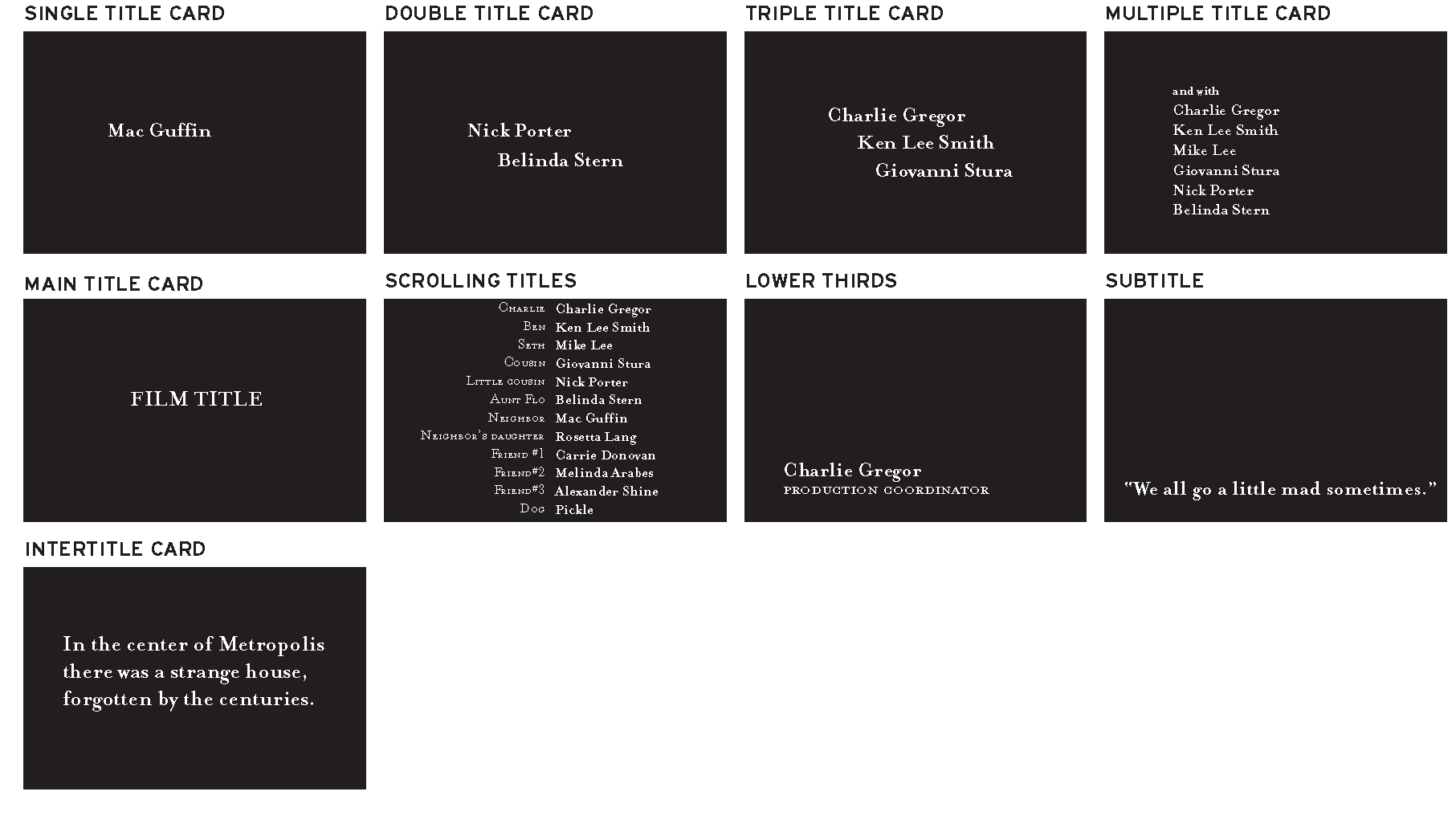
• A single title card contains one name credit. A
single title card is typically used in opening titles to display the
name of the lead actors and the creative people involved in the movie
(director, producers, writer, cinematographer, composer). These are
generally referred to as the above-the-line credits.
• A double title card contains two name credits. A double title card typically is used to display the names of supporting actors and additional creative people involved in the movie.
• A triple title card contains three name credits. A triple title card is typically used to display the names of additional supporting actors.
• A multiple title card contains more than three name credits. A multiple title card is typically used to name additional supporting actors or extras.
• A main title card displays the main title of the movie.
• Scrolling titles are titles that move sequentially in and out of frame, generally used as end titles. End scrolling titles usually repeat the credits of the opening titles (the talent credits of the opening titles are reorganized either in order of appearance or alphabetically) and then display the below-the-line full crew and cast credits: the special effects, props, soundtrack, equipment and location rentals, film stock, and so on. A title designer can create the design and layout of the text blocks, but if digital scrolling titles are needed (as opposed to a film-out), some companies in Hollywood specialize in digital scrolling titles that avoid flickering type and look nice and smooth.
• A lower third is a title placed on the lower-third of the screen (although there might be other screen placements you could consider), generally used to display the information—name and title—of a person being interviewed or a location.
• Subtitles are titles placed on the lower-third part of the screen (or sometimes on the top of the screen to avoid covering relevant information on-screen or previously existing lower thirds). These are generally used to translate dialogue in another language.
• Intertitles are title cards that display the time, place, prologue, or quotes. In silent films, an intertitle is often used to convey minimal dialogue or information that can’t be deduced from the talent’s body language or the scene’s settings.

Figure 1.3 Title card examples.
Depending on the type of movie you are working with (home movie, independent flick, Hollywood movie, or something else), the order in which the credits in opening and closing titles appear on-screen and their font size, especially in large-budget productions, are greatly determined by the talent’s contracts, union contracts, and industry conventions. The designer will have very little (if any) say in that. For example, a clause in a talent’s contract might dictate that his credit shouldn’t be in a smaller font size than the one of the main title card. A different clause in another talent’s contract might dictate that her title card be the first one, regardless of who else acts in the film.
Also, depending on the film’s domestic and international distribution, you might have to composite different studio logos at the head of your title sequence. Or you might even have to deliver a version of your title sequence without any text so that English titles can be replaced by titles in another language.
As you’re approaching designing a title sequence, you should obtain any pertinent information about the talent or distribution contracts that might affect the title cards’ order or text size.
• Ask the client to give you a digital file containing the typed credits of the movie, with numbered title cards. For example:
1. XYZ logo
2. ABC logo
3. DFG production presents
4. A film by First Name Last Name
5. With First Name Last Name
6. And First Name Last Name … and so on.
• Avoid typing anything else; use only the typed information with which you’ve been provided.
• Copy and paste the names from the file the client provided you with into the software you’re using to create the title cards.
• Check the titles often for accidental letters you might have inserted from using common keyboard shortcuts (for example, in Illustrator, watch out for extra f’s from using the Type tool or i/’s from using the Selection tool). When you are pasting your title card text in your software and then pressing a keyboard shortcut, it’s possible that instead of changing to a different tool you are actually typing an unwanted letter in the text box.
• When you’re ready to show your title cards to your client, send the actual stills of your project file for review. Don’t send an early version or alternate versions; simply send the stills taken from the latest version of the actual project you are working on. There are a number of quick ways to accomplish this task. You could take a snapshot of the title cards directly from the software interface or from your rendered QuickTime file, or you could even export a digital still frame from your software and then email or fax it to your client for approval.
• A double title card contains two name credits. A double title card typically is used to display the names of supporting actors and additional creative people involved in the movie.
• A triple title card contains three name credits. A triple title card is typically used to display the names of additional supporting actors.
• A multiple title card contains more than three name credits. A multiple title card is typically used to name additional supporting actors or extras.
• A main title card displays the main title of the movie.
• Scrolling titles are titles that move sequentially in and out of frame, generally used as end titles. End scrolling titles usually repeat the credits of the opening titles (the talent credits of the opening titles are reorganized either in order of appearance or alphabetically) and then display the below-the-line full crew and cast credits: the special effects, props, soundtrack, equipment and location rentals, film stock, and so on. A title designer can create the design and layout of the text blocks, but if digital scrolling titles are needed (as opposed to a film-out), some companies in Hollywood specialize in digital scrolling titles that avoid flickering type and look nice and smooth.
• A lower third is a title placed on the lower-third of the screen (although there might be other screen placements you could consider), generally used to display the information—name and title—of a person being interviewed or a location.
• Subtitles are titles placed on the lower-third part of the screen (or sometimes on the top of the screen to avoid covering relevant information on-screen or previously existing lower thirds). These are generally used to translate dialogue in another language.
• Intertitles are title cards that display the time, place, prologue, or quotes. In silent films, an intertitle is often used to convey minimal dialogue or information that can’t be deduced from the talent’s body language or the scene’s settings.
Figure 1.3 Title card examples.
Depending on the type of movie you are working with (home movie, independent flick, Hollywood movie, or something else), the order in which the credits in opening and closing titles appear on-screen and their font size, especially in large-budget productions, are greatly determined by the talent’s contracts, union contracts, and industry conventions. The designer will have very little (if any) say in that. For example, a clause in a talent’s contract might dictate that his credit shouldn’t be in a smaller font size than the one of the main title card. A different clause in another talent’s contract might dictate that her title card be the first one, regardless of who else acts in the film.
Also, depending on the film’s domestic and international distribution, you might have to composite different studio logos at the head of your title sequence. Or you might even have to deliver a version of your title sequence without any text so that English titles can be replaced by titles in another language.
As you’re approaching designing a title sequence, you should obtain any pertinent information about the talent or distribution contracts that might affect the title cards’ order or text size.
Avoiding Typos
Typos are the one mistake you want to avoid while working on a title sequence. After you worked long and hard on a film or a TV show, would you want your name to be spelled wrong? I don’t think so. The following are a series of tips that will help you avoid a number of headaches and keep your clients happy.• Ask the client to give you a digital file containing the typed credits of the movie, with numbered title cards. For example:
1. XYZ logo
2. ABC logo
3. DFG production presents
4. A film by First Name Last Name
5. With First Name Last Name
6. And First Name Last Name … and so on.
• Avoid typing anything else; use only the typed information with which you’ve been provided.
• Copy and paste the names from the file the client provided you with into the software you’re using to create the title cards.
• Check the titles often for accidental letters you might have inserted from using common keyboard shortcuts (for example, in Illustrator, watch out for extra f’s from using the Type tool or i/’s from using the Selection tool). When you are pasting your title card text in your software and then pressing a keyboard shortcut, it’s possible that instead of changing to a different tool you are actually typing an unwanted letter in the text box.
• When you’re ready to show your title cards to your client, send the actual stills of your project file for review. Don’t send an early version or alternate versions; simply send the stills taken from the latest version of the actual project you are working on. There are a number of quick ways to accomplish this task. You could take a snapshot of the title cards directly from the software interface or from your rendered QuickTime file, or you could even export a digital still frame from your software and then email or fax it to your client for approval.
Subscribe to:
Posts (Atom)